Coming Soon
Exercise app icon Exercise Design workouts. Log every rep, set, timer, and rest.
Workout planner and logger for iPhone and iPad

Design workouts your way, then log every rep, hold, and rest interval without compromise.

Exercise is built for self-designed workouts, from strength sessions to detailed stretch plans. Mix sets, reps, timed exercises, rest between reps, notes, distance, and circuit blocks in one plan, then log it the way you actually perform it.

Timed, sets, and rest tracking Flexible workout editing while you log Reusable templates for real workouts

Install Exercise and get 7 days of Premium access without starting a subscription. After that, keep Free with up to 3 saved templates and unlimited logging, or subscribe for unlimited templates, reminders, analytics, AI generation, and more.

Overview

What is Exercise?

Exercise is for people who already know how they want to train and need an app that can keep up. If your workout mixes timed holds, rep counts, set counts, rest intervals, mobility work, and strength work in the same template, the app is designed for that level of detail.

  • Create reusable workout templates for strength, cardio, mobility, and mixed sessions.
  • Handle workouts with 45-second holds, 1-minute stretches, rep targets, and short rests in the same plan.
  • Quick log from scratch or start from a saved template, then adapt the session without rewriting the original plan.
  • Add Apple Health, export, and Premium features like import, routines, and reminders when they fit your setup. Optional iCloud sync is coming soon.
Workflow

From workout design to the last logged rep

Exercise is built to support the whole loop: design, log, and review.

01

Build workouts that match how you actually train

Create templates with timed holds, sets and reps, distance tracking, rest periods, and circuit blocks. Save everything from a lifting day to a long daily stretch plan and keep it ready to run again.

02

Log flexibly, even when the plan changes

Start from a saved template or quick log from scratch. Adjust sets, reps, timing, notes, rest, and exercise structure while you train without mutating the original template.

03

Review progress without losing context

Track streaks, totals, charts, and exercise-specific performance so you can see how your actual workouts are evolving over time.

Features

Built for workouts that mix sets, reps, timers, and rest

The point is not just to record that you exercised. It is to capture the structure you actually programmed.

Core

Workout templates with real exercise structure

Build workout templates with timed, sets-based, distance-based, and rest-driven exercises. Save them once, then log from them again and again.

Core

Flexible logging for real workouts

Change reps, weights, durations, notes, rest periods, and even the workout structure while you log. The session stays flexible without rewriting the original template.

Premium

On-device AI workout generation

Describe what you want in plain language and generate a starting point on device. Then shape it into a reusable workout template that matches how you actually train.

Premium

Insights, records, and streaks

See charts, totals, streaks, and exercise-level performance so your workout history turns into useful feedback instead of a pile of entries.

Premium

Circuits and supersets

Create repeating training blocks for HIIT, supersets, tri-sets, and circuit-style programming with rest between rounds and per-round tracking.

Premium

Routines, reminders, and streaks

Turn a workout template into a routine with a recurring reminder schedule so the app can notify you and track your streak over time.

Optional

HealthKit and Live Activities

Save completed workouts to Apple Health, contribute to Activity Rings, and keep an active workout visible while you train.

Coming soon

iCloud sync across your devices

Optional iCloud sync is planned so your templates, routines, and workout history can follow you across your own devices when you choose to turn it on.

Screens

See how Exercise handles workout design, live logging, and review

Every screen is built to stay readable mid-session, whether you are following a lifting plan or a detailed mobility workout.

Workouts

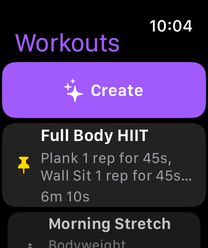
Keep custom workout templates organized, pinned, and ready to run again.

Workout Logging

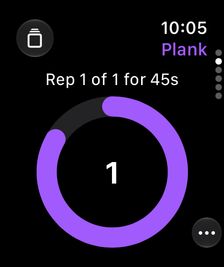
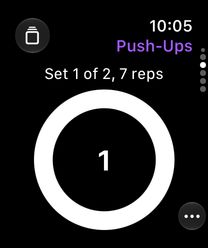
Track sets, reps, timers, rest, weights, and notes while the workout is in motion.

AI Workout

Generate a workout template from a plain-language prompt, then make it your own.

Workout Detail

Review completed work with exercise-level detail after the session.

Edit and refine

Refine rest periods, timed holds, rep targets, and exercise ordering over time.

Insights on iPad

See trends, streaks, totals, and exercise performance in a spacious dashboard view.

Pricing

Start free, then unlock the rest when you want more room

The free tier is enough to prove the workflow with your own workout templates, and every install starts with 7 days of Premium access before you ever decide whether to subscribe.

Free

$0

Save up to 3 workout templates and log unlimited workouts, including ad hoc sessions with timed exercises, sets, reps, distance, rest, and session editing.

  • Save up to 3 workout templates
  • Log unlimited workouts, including ad hoc sessions
  • Timed, sets, reps, rest, and distance tracking
  • Export workouts for backup

Premium

$2.99/month or $19.99/year

Every install starts with 7 days of Premium access without asking you to subscribe first. After that, Premium includes unlimited saved templates, workout import, AI generation, reminders, circuits, and full insights.

  • 7 days of Premium access without subscribing first
  • Unlimited saved workout templates
  • Import workouts
  • Unlimited workout logging, including ad hoc sessions
  • AI workout generation
  • Full analytics and exercise insights
  • Circuits, supersets, routines, and reminders

Free vs Premium

Feature Free Premium
Workout logging Free Unlimited, including ad hoc sessions Premium Unlimited, including ad hoc sessions
Saved workout templates Free Up to 3 templates Premium Unlimited templates
AI workout generation Free Not included Premium Included
Import workouts Free Not included Premium Included
Full analytics and insights Free Basic logging only Premium Included
Circuits and supersets Free Not included Premium Included
Routines, reminders, and streaks Free Not included Premium Included
FAQ

Direct answers about workout structure, planned sync, HealthKit, AI, and device support

Start with how Exercise handles your workout templates and routines, then get into the supporting details.

What kind of workouts is Exercise built for?

Exercise is built for self-designed workouts with real structure. You can mix sets, reps, timed holds, distance, notes, rest between reps, and circuit blocks in the same workout template instead of flattening everything into a generic timer or checklist.

Can I mix timed and rep-based exercises in one workout template?

Yes. That is one of the main reasons Exercise exists. A single workout can include 45-second holds, 1-minute stretches, low-rep mobility moves, higher-rep strength work, and short rest intervals between reps or rounds.

Can I change a workout while I am logging it?

Yes. You can adjust reps, timing, weights, notes, rest, and even the structure of the session while you log. The active workout stays flexible without forcing you to rewrite the original template first.

Does Exercise support iCloud sync?

Optional iCloud sync is coming soon. Exercise works fully as a local workout app today, and the planned sync feature is intended to let templates, routines, and workout history follow you across your own devices through iCloud.

How does AI workout generation work?

Exercise can generate workouts from a plain-language prompt on device. You describe what you want to do, then review, refine, and either log the workout immediately or save it as a reusable template.

Do I have to subscribe to start the 7-day Premium period?

No. Exercise gives you 7 days of Premium access automatically when you install the app. You do not have to start a subscription just to try Premium, and you can decide after those 7 days whether you want to subscribe.

What gets shared with Apple Health?

When you enable HealthKit and choose to save a workout, Exercise writes workout timing, activity type, measured energy when available, optional effort data, and minimal sync metadata. Exercise names, sets, reps, and notes are not written to Apple Health.

Can I back up or move my workouts?

Yes. Exercise includes export for backups, and import requires Premium access so you can move workouts and workout logs with JSON files under your control.

Which devices is Exercise built for?

Exercise is designed for iPhone and iPad. The app is built to stay usable during live workout logging on iPhone and to make review and insights feel roomy on iPad.

Download

Ready to build workouts that match how you actually train?

Exercise is for people who want to define the workout themselves and log it without flattening everything into a generic timer or checklist.

Download on the App Store

Need details first? Start with the privacy page, terms, or support page.